 water
waterTHE WHOLE PICTURE
Work, in flow.
A home for your conversations, your projects and the people and agents doing the work.
For Sam + Samad • Product walkthrough
V1 includes every designed feature, plus Rooms, Agents and Accounts.
01 / ARRIVE
Your way in.
One identity. Start privately, join your team, or create a new workspace.
A calm first moment.
The accepted Water mark and welcome lead into one account-entry flow.
Accepted design artwork throughout this walkthrough; not a live app.
An account, not a workspace login.
Enter email or username. Existing accounts can use a password or an emailed code.
An unknown username stays here. A new email begins signup.
Make it yours.
Verify email, set a password, then add your name and username. Photo and bio are optional.
Your permanent identity survives changes to your handle or email.
You can start with just you.
Personal is always available. Invitations wait here without forcing you into a workspace.
Accepting a workspace invite is separate from connecting with a person.
Give the team a home.
Name the workspace, optionally add an image, then invite people—or skip invitations.
Creating the workspace happens once, before the optional invite step.
An invitation is not access.
New invitations remain pending until accepted. Onboarding invites start as Member.
Skipping this step is fine. You can invite people later.
Ready before everything is set up.
Create a project or Room if useful. Or Dive In with the new workspace already selected.
Neither creating a project nor creating a Room is required to continue.
02 / CONTEXT
Same you. Different spaces.
Personal and workspaces organize work—not separate versions of your identity.
Change context, not identity.
The chooser holds permanent Personal and your joined workspaces.
Current and private conversations remain global.
A place that belongs to you.
Personal exposes Current and Projects. Private tasks and projects stay self-only in V1.
No collaborators, invitations or Room grouping in Personal.
A shared place with boundaries.
Workspace navigation opens Projects, Rooms, Team and Accounts around Current.
Agents are in V1. How the Agents module relates to the existing Team entry still needs a decision.
A thought can start anywhere.
Global quick capture starts in Personal / No project. Inside a project, it inherits that project.
Workspace labels keep identically named projects distinguishable.
03 / DAILY RHYTHM
What needs you, now?
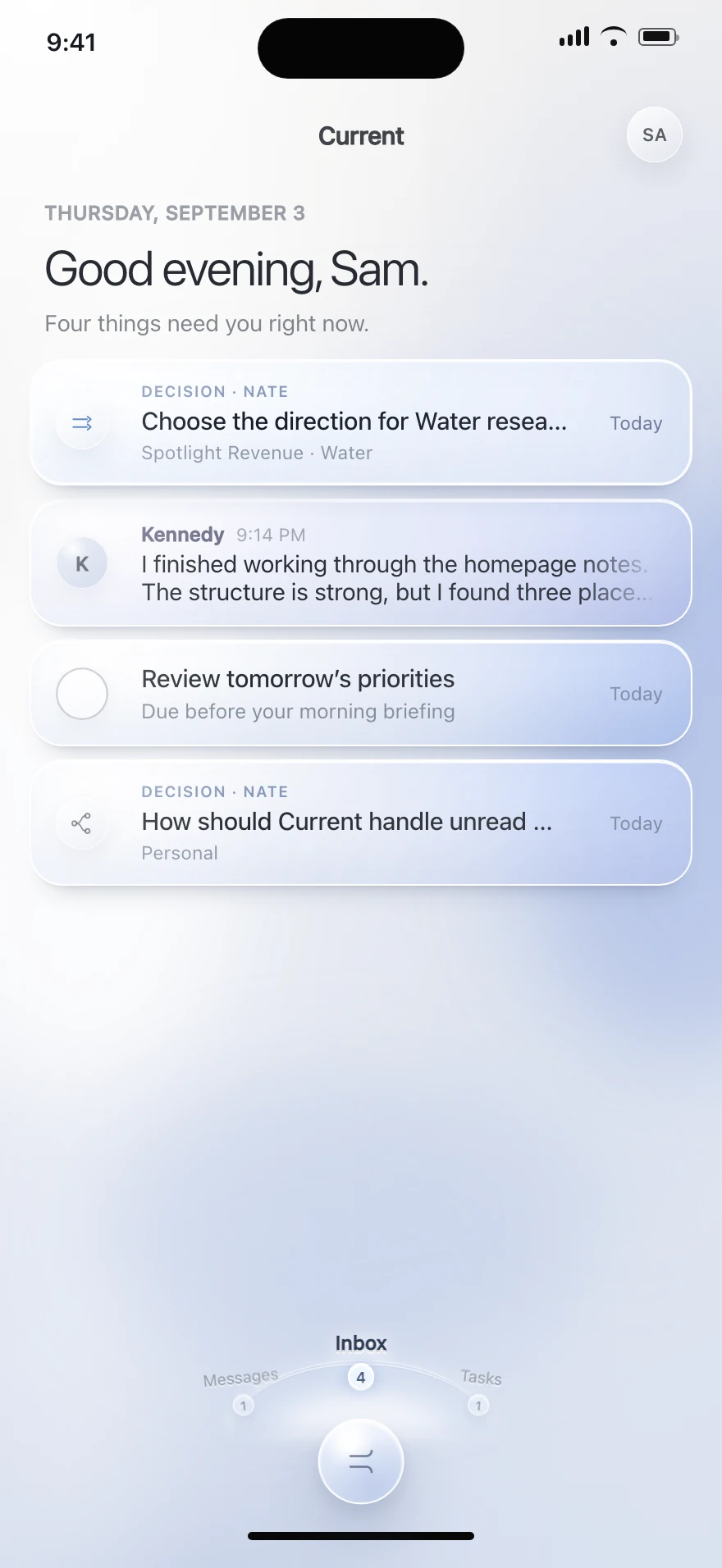
Current brings your attention together across every permitted context.
Attention, without the hunt.
Unread messages, decisions, due-today work and requests share a global Inbox.
Future-due tasks belong in the appropriate Tasks view, not today’s Inbox.
Your ongoing conversations.
People, agents and private groups live here. Room and Project channels stay in their own places.
Changing workspace never creates a second copy of a private conversation.
Your work, through time.
Use Today, Upcoming, All and No date, with calendar and overdue context.
Opening a task and coming back preserves your place.
A request becomes a decision.
Incoming connection requests open their own Accept / Decline flow. Workspace invitations have a separate flow.
Resolved requests must not retain stale pending actions.
04 / CONVERSATIONS
Talk where the work is.
The conversation remains the conversation. A task can point into it without copying it.
Start with a real person.
Search known recipients or deliberately look up an exact username or email.
This is not a public people directory.
See what you genuinely share.
Profiles show shared workspaces, Rooms and projects only when both people can access them.
A connection does not grant workspace membership. Personal projects never appear here.
A message can carry the work.
Use the accepted composer for text, attachments, dictation and task links.
A task tag in a draft has not yet created a backlink.
Speak into the same draft.
Dictation returns text to the composer. Search dictation fills a query, not an automatic selection or send.
Formatting, person mentions and code stay in the shared composer; a task link is not a person mention.
One message. One source.
Sending publishes the message and its explicit task reference. The task tag can open the task.
Linking a task is not a blanket mention or an access grant.
The conversation comes with context.
Linked messages on a task point back to the exact original message, then let you return.
No duplicate task discussion, comment composer or copied conversation history.
05 / FROM THOUGHT TO ACTION
Small capture. Real depth.
Start with a thought. Add scope only when the work needs it.
Catch it before it disappears.
The compact composer starts with the task title and quiet essentials. Expanding does not submit it.
Global default: Personal / No project. In-project entry inherits context.
Give the work enough shape.
Destination, status, dates, assignee, priority, description, subtasks and attachments stay in one draft.
Expand and collapse without losing fields or creating duplicates.
Space for the actual thinking.
Open Description for longer scope, then return to the same task draft.
“Ready when” is your writing, not an imposed field. Voice and AI polishing require real services.
Better wording. Still your scope.
Polish with AI updates wording inline and leaves it editable. Undo restores the original; no separate comparison screen.
The interaction is accepted. The real AI service still needs implementation.
Small steps are still real work.
Subtasks have their own identity, owner, dates and scope, with quiet parent context.
One nesting level. Finishing every child does not automatically complete the parent.
Responsibility follows eligibility.
Workspace tasks can go to eligible project members, including eligible agents. Personal work is self-only.
Changing destination removes an ineligible assignee with a clear explanation.
Dates stay deliberate.
Start and due dates are optional and independently clearable. Done applies the pending selection.
Start after due blocks Done. Dismissal discards pending edits.
Make urgency explicit.
Urgent, High, Normal and Low communicate priority. Normal is the default; dismissing the picker changes nothing.
Priority, ownership and dates remain independent properties.
Keep meaning when work moves.
Move inside the same workspace. A different workflow asks for an explicit destination status.
Same workflow keeps status; no workflow keeps complete/incomplete. Cancel changes nothing.
06 / SHARED WORK
An outcome gets a home.
Projects hold the conversation, the tasks, the people and the result together.
Your projects, at a glance.
My projects, Discover and Archived show only what you are permitted to see.
Ungrouped is the default. Search and grid/list views remain available.
Group only when it helps.
Optionally view projects by Room. Standalone projects remain valid.
This is your viewing preference, not a membership change.
The channel holds the shared context.
A new project opens into its channel. Its title menu connects the project’s main destinations.
Channel · Tasks · Files · Members · Details · Activity
Choose the right view of work.
Use list, board, filters or a simple no-workflow checklist. Drag within a column to order work.
Moving within a column changes order, not status. Cancel restores the order.
Let statuses fit the work.
Configure workflow names and colors, including custom colors, with clear validation and save feedback.
Preserve edits and reconcile interrupted saves automatically.
Change the project without losing it.
Details holds the name, description, icon and optional same-workspace Room association.
Changing a Room does not change workspace or project membership.
Finished is different from shelved.
Complete archives as completed. Archive shelves the project. Restore returns the same project to Active.
No separate Reopen. Permanent project deletion is not in the accepted V1 contract.
07 / DELIVERABLES
The work leaves something real.
Files belong in their context and open through a consistent viewing experience.
Find the thing you need.
Browse and search project files, including upload progress and relevant file actions.
A failed upload is not a delivered file.
Look closer.
Images support fit, zoom and pan in the shared viewer.
Closing returns to the original file context.
Read it without losing your place.
Document navigation preserves the relationship to the project and conversation.
The design’s sample document is not proof of a production PDF engine.
See the result in motion.
Video has centered playback, transport, seek and fullscreen behavior.
Exit fullscreen before leaving the viewer.
Listen in the same flow.
Audio uses the shared media experience. Open and download hand off to the platform.
File access stays permission-scoped, including through old links.
08 / AGENT WORK
Know what is actually happening.
Activity shows agent execution—not a generic feed of project changes.
The latest progress comes first.
See current work, expandable history and the original request.
A quiet status must be grounded in actual execution evidence.
Parallel work stays understandable.
Concurrent tasks keep separate progress, histories and result destinations.
One task completing does not complete the entire project.
A question needs a person.
See the agent’s question and context. Respond in channel opens the conversation without sending for you.
The human remains the decision-maker.
Blocked is not broken.
A missing permission names the affected resource and offers the relevant conversation.
Opening the resolution path never grants access automatically.
Unknown stays unknown.
Retain the last-confirmed update when fresh evidence is missing. Refresh reads state; it does not restart work.
Stale is different from failed or disconnected.
A failure is a known outcome.
Retain the progress already recorded and open the related channel for a recovery request.
Opening recovery does not resend, restart or retry automatically.
Keep the last known truth.
Confirmed disconnection has its own notice. Reconnecting is not proof that work resumed.
Recovery opens an unsent request, not an automatic retry.
Follow the result home.
Completion is result-first, with delivery context and retained history. Open the original channel result.
A completed review does not mean its recommendations were implemented.
09 / TRUST AND ACCESS
Together, with boundaries.
Being connected, joining a workspace and joining a project are different relationships.
An explicit way into a workspace.
Preview the workspace, inviter, role and current account before Accept or Decline.
Expired or revoked invitations cannot be accepted. Wrong-account sign-in retains the destination.
Steward the shared place.
Owners manage workspace details, members, admins and invitations, and may add another owner.
Adding an owner does not remove your ownership or make you leave.
Useful authority, with limits.
Admins manage details, invite Members and remove ordinary members—not owners or other admins.
Permissions must hold beyond the visible controls.
Read what you can access.
Members can view permitted workspace details and the directory, then leave when needed.
Workspace membership does not automatically join every Room or project.
Access to the work is explicit.
Project members must be eligible in the workspace. Agents can join when eligible, without automatically starting work.
Connection alone is insufficient; pending invitation grants no access.
Leave a space, not your identity.
Workspace access ends; contributions, Personal work and eligible private conversations remain.
The last owner must add another before leaving. Leaving the last workspace returns to Personal.
10 / ROOMS
A shared context around the work.
Rooms belong in V1. Some relationships are established; the complete module still needs shaping.
Projects can sit within a Room.
A project may be associated with one Room in its workspace—or no Room at all.
Room grouping organizes the view. It never enrolls people automatically.
Define the Room itself.
We still need the complete creation, membership, role, discovery and lifecycle behavior.
These are V1 decisions to resolve—not features deferred to another release.
Belonging together does not automatically grant access.
11 / AGENTS
Teammates, not scattered bots.
A continuous agent identity connects conversations, participation, work and results.
An agent joins the right context.
Eligible agents can be added to a project. Participation alone does not start an assignment.
One agent identity; context-specific visibility and authority.
Work has a visible story.
Private conversations and shared project work connect to the Activity experience you just explored.
An agent can have several tasks without blending their histories.
Define the front door to your agents.
The full Agents experience and its relationship to the existing Team navigation need a decision.
Discovery, profile depth, provisioning and controls are unresolved V1 details.
conversation
participation
results
Continuous identity.
Different context and permissions.
12 / ACCOUNTS
A real part of V1. Not a guess.
Accounts is included. Its full purpose and behavior have not yet been pinned down in the reviewed contracts.
Give this area its actual meaning.
Which objects live here? What does a person connect or manage? Who can see and change them?
We will not silently turn Accounts into billing, login settings or integrations without that decision.
Accounts
An honest space for the decision.
Not a fabricated screen.
THE PROMISE
The whole product. One story.
This is a visual walkthrough of intended behavior—not a claim that the native app or its integrations already work.
Welcome, password/code sign-in, signup, profile, invitations and workspace creation.
Chooser, global identity, private Personal work, context-aware capture.
Inbox, private Messages, task calendar/filters and requests.
Recipient lookup, connections, shared profile context, attachments, dictation, task tags and backlinks.
Quick/full capture, descriptions, subtasks, assignment, dates, priorities, status, moves and order.
Directory/discovery/archive, creation, Room grouping, channel, details and lifecycle.
Search, upload states, image/document/video/audio viewers and platform handoffs.
Workspace/project membership, roles, invitations, owners, removal/leave and access loss.
Working, concurrent, waiting, blocked, stale, offline, failed and completed work.
Discussion and optional project grouping are known; complete module behavior remains open.
Identity, conversation, participation and activity are known; complete module behavior remains open.
Included; purpose, objects, actions and permissions need definition.
Source and presentation boundaries
Based on accepted Water screen references and interaction contracts. Samples are design fixtures. This walkthrough does not create accounts, send messages, change permissions or run agents.
Read the onboarding handoff, design contracts and shared-identity foundation. Repository access is required. A thorough coding-agent specification is the next deliverable, not hidden inside this presentation.